> ## Documentation Index
> Fetch the complete documentation index at: https://airmdr-docs-crowdstrike-skills-catalog.mintlify.site/llms.txt
> Use this file to discover all available pages before exploring further.
# Duo Security
> Duo Security is a cloud-based multi-factor authentication (MFA) and access security platform that helps protect applications and networks by requiring users to verify their identity using multiple authentication methods before granting access.
### Pre-requisites
User Organization must have valid credentials to access the [Duo Admin Panel](https://admin.duosecurity.com/).
### Generate Duo Security Admin API
The Admin API allows you to programmatically create, retrieve, update, and delete users, phones, hardware tokens, admins, applications, and more
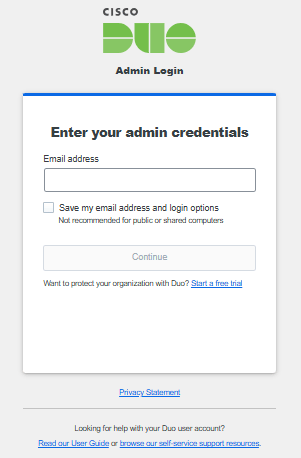
1. Log in to your [Duo Admin Panel](https://admin.duosecurity.com/).
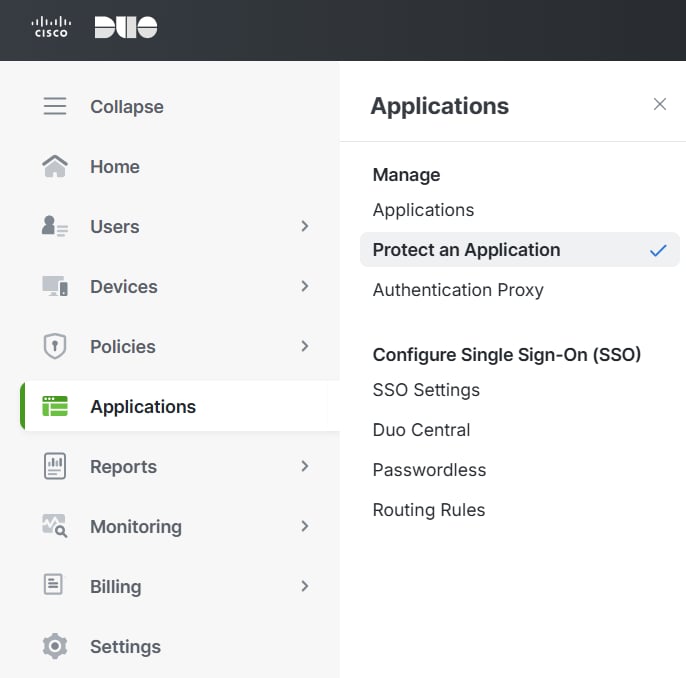
 2. Navigate to **Applications** → **Protect an Application**.
 **Generate Admin API Credentials**
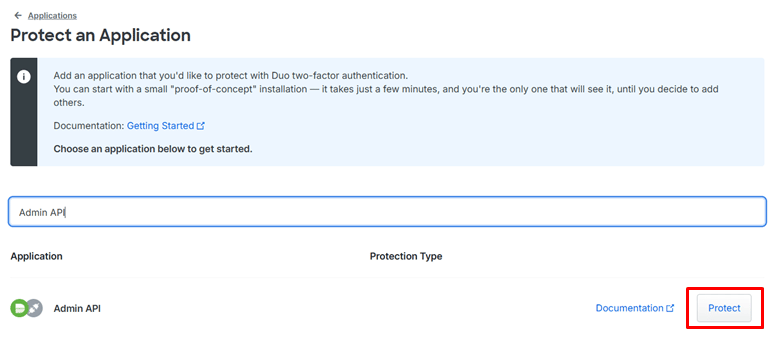
1. Search for the type of integration "Admin API".
2. Click **Protect** to the far right to configure the Auth API.
**Generate Admin API Credentials**
1. Search for the type of integration "Admin API".
2. Click **Protect** to the far right to configure the Auth API.
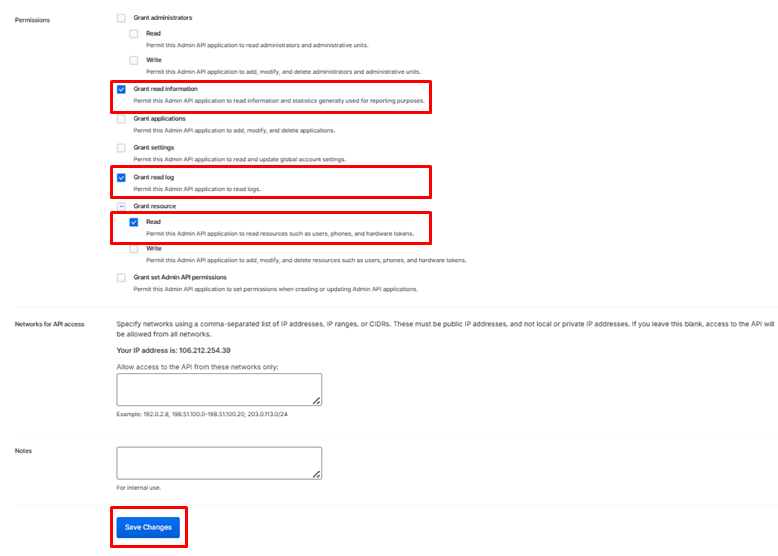
 3. Scroll down to the Permissions section.
4. Select the required permissions (`Grant read information` , `Grant read log`, and `Grant read resource` .
5. Click **Save Changes**.
3. Scroll down to the Permissions section.
4. Select the required permissions (`Grant read information` , `Grant read log`, and `Grant read resource` .
5. Click **Save Changes**.
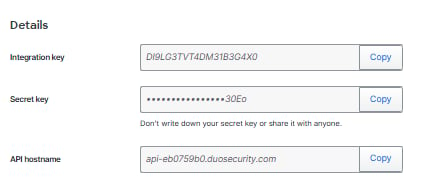
 6. In the Details section, copy and secure the **Integration Key (ikey)** – Identifies your app, **Secret Key (skey)** – A secure credential, and **API Hostname** – URL to interact with Duo.
 Email the **Integration Key (ikey)**, **Secret Key (skey),** and the **API Hostname URL** to AirMDR or self Configure Duo Security in AirMDR Integrations Dashboard.
### Configure Duo Security Admin API in AirMDR Integrations Dashboard
1. Navigate to [AirMDR](https://app.airmdr.com/auth/login), provide the credentials and click **Login.**
2. Navigate to the AirMDR Integrations Dashboard in the left navigation pane and select **Integrations.**
3. Use the search option, enter the keyword "**Duo Security**", select the **Connections** tab, and click **Add New Connection**.
4. Enter an unique name to the **Instance** (e.g., your org name-DuoSecurity) and brief **Description** to easily identify the user connection by AirMDR.
5. Enter the generated **Integration Key (ikey)**, **Secret Key (skey)**, **API Hostname URL** and Expiry (optional) in the Authentication Details field params, and click **Save.**
### Test the Integration
* Attempt login with a user enrolled in Duo.
* Check if **push notifications**, **SMS**, or **OTP codes** work.
* Monitor API logs in the **Duo Admin Dashboard**.
Email the **Integration Key (ikey)**, **Secret Key (skey),** and the **API Hostname URL** to AirMDR or self Configure Duo Security in AirMDR Integrations Dashboard.
### Configure Duo Security Admin API in AirMDR Integrations Dashboard
1. Navigate to [AirMDR](https://app.airmdr.com/auth/login), provide the credentials and click **Login.**
2. Navigate to the AirMDR Integrations Dashboard in the left navigation pane and select **Integrations.**
3. Use the search option, enter the keyword "**Duo Security**", select the **Connections** tab, and click **Add New Connection**.
4. Enter an unique name to the **Instance** (e.g., your org name-DuoSecurity) and brief **Description** to easily identify the user connection by AirMDR.
5. Enter the generated **Integration Key (ikey)**, **Secret Key (skey)**, **API Hostname URL** and Expiry (optional) in the Authentication Details field params, and click **Save.**
### Test the Integration
* Attempt login with a user enrolled in Duo.
* Check if **push notifications**, **SMS**, or **OTP codes** work.
* Monitor API logs in the **Duo Admin Dashboard**.