> ## Documentation Index
> Fetch the complete documentation index at: https://airmdr-docs-crowdstrike-skills-catalog.mintlify.site/llms.txt
> Use this file to discover all available pages before exploring further.
# Microsoft Defender
> The Microsoft Defender integration enables AirMDR to authenticate to Microsoft Defender APIs and retrieve incident and security context for investigation, enrichment, and workflow automation.
## Overview
The **Microsoft Teams integration** uses an application registration in Microsoft Entra ID and authenticates with Tenant ID, Client ID, and Client Secret. Microsoft documents this as the standard application-based method for accessing Microsoft Defender APIs without a user session.
### Supported Versions
| Component | Supported Version |
| :----------------------------------- | :---------------------------------- |
| Microsoft Defender XDR | Current cloud tenant |
| Microsoft Defender for Endpoint APIs | Current supported API set |
| Microsoft Entra ID | Current supported cloud directory |
| AirMDR Platform | Current supported cloud deployments |
Microsoft provides separate but similar app-registration guidance for **Microsoft Defender XDR** and **Microsoft Defender for Endpoint**, both using Microsoft Entra application authentication.
### Authentication
AirMDR uses **application-based OAuth authentication** through Microsoft Entra ID.
| Credential | Description |
| :---------------- | :---------------------------------------------------------------------------------------- |
| **Tenant ID** | Directory (tenant) identifier from the Microsoft Entra app |
| **Client ID** | Application (client) identifier from the Microsoft Entra app |
| **Client Secret** | Secret generated under the app registration |
| **Remote Agent** | Optional AirMDR routing component selected in AirMDR, not generated in Microsoft Defender |
### Pre-requisites
Active tenant in Microsoft Entra ID
Access to Microsoft Defender for Endpoint (or relevant Defender service with API data)
### Set Up Steps
1. Log in to your [Azure Portal](https://portal.azure.com/).
2. Go to **Microsoft Entra ID** (formerly Azure AD).
3. In the left menu, click **Manage** → **App registrations**.
1. Click **+ New registration**.
2. Provide the mandatory details:
* (**Application Name**: Enter a name for your app (e.g., `airmdr-defender`).
* **Supported Account Types**: Select "*Accounts in any organizational directory (Any Microsoft Entra ID tenant - Multitenant)*" option). 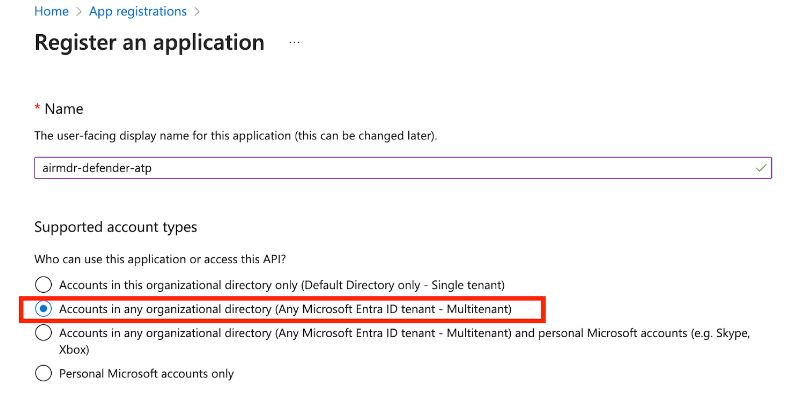 3. Click **Register**.
**Redirect URI (Optional)**: If your app uses authentication, enter a URL (e.g., `https://myapp.com/auth`).
1. After successful registration, you will see the **App Overview** page.
Copy **Application (Client) ID** – Identifies your app.
Copy **Directory (Tenant) ID** – Identifies your Azure AD tenant.
1. In the application Overview page left navigation pane, select **Manage** dropdown.
2. Click **API Permissions**.
3. Click **+ Add a permission**
4. Select **APIs my organization uses** tab.
5. Search and select the API "**Microsoft Threat Protection**".
6. Click on **Application permissions**.
7. Select the required permissions:
* **To Fetch List of Incidents** - `Incident.Read.All`
8. Click **Add permissions** at the bottom of the page.
9. Click **API permissions**, select **Yes** for **Grant admin consent confirmation** to allow access.
1. In the application Overview page left navigation pane, select **Manage** dropdown.
2. Click **Certificates & secrets**.
3. Click **+ New client secret**.
3. Click **Register**.
**Redirect URI (Optional)**: If your app uses authentication, enter a URL (e.g., `https://myapp.com/auth`).
1. After successful registration, you will see the **App Overview** page.
Copy **Application (Client) ID** – Identifies your app.
Copy **Directory (Tenant) ID** – Identifies your Azure AD tenant.
1. In the application Overview page left navigation pane, select **Manage** dropdown.
2. Click **API Permissions**.
3. Click **+ Add a permission**
4. Select **APIs my organization uses** tab.
5. Search and select the API "**Microsoft Threat Protection**".
6. Click on **Application permissions**.
7. Select the required permissions:
* **To Fetch List of Incidents** - `Incident.Read.All`
8. Click **Add permissions** at the bottom of the page.
9. Click **API permissions**, select **Yes** for **Grant admin consent confirmation** to allow access.
1. In the application Overview page left navigation pane, select **Manage** dropdown.
2. Click **Certificates & secrets**.
3. Click **+ New client secret**. 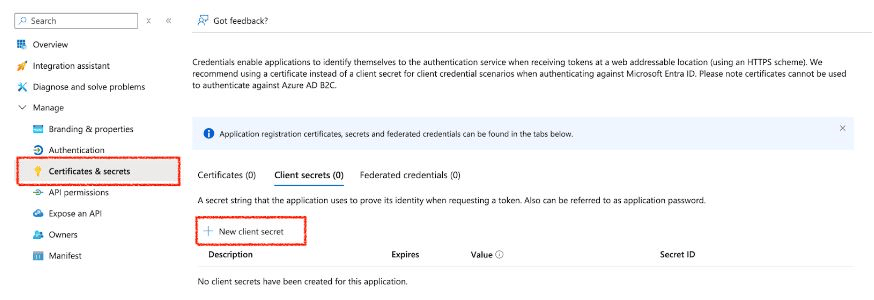 4. Enter a description (e.g., `MySecretKey`) and set expiration.
5. Click **Add**.
Copy and secure the **Value** (**Client Secret**) immediately – (It won’t be shown again!)
Email the **Tenant ID**, **Client ID** and the **Client Secret Value** to AirMDR or self Configure Microsoft Defender in AirMDR Integrations Dashboard.
### Evaluate Microsoft Defender
### Pre-requisites
**Azure App Registration** with API permissions for **Microsoft Defender.**
**Client ID, Tenant ID, and Client Secret**.
Open **cURL** and run the following command to check if your API Access is working:
MDE uses **OAuth 2.0 authentication**. First, request an access token from **Microsoft Entra ID (Azure AD)**:
```text theme={null}
curl -X POST "https://login.microsoftonline.com//oauth2/v2.0/token" \
-H "Content-Type: application/x-www-form-urlencoded" \
-d "client_id=" \
-d "client_secret=" \
-d "grant_type=client_credentials" \
-d "scope=https://api.security.microsoft.com/.default"
```
**Replace:**
* `` – Your Azure Directory (Tenant) ID.
* `` – Your App Registration **Client ID**.
* `` – Your App Registration **Client Secret**.
**Expected Response (Success)**:
```json theme={null}
{
"token_type": "Bearer",
"expires_in": 3599,
"access_token": "eyJ0eXAiOiJKV1QiLCJhb..."
}
```
* This verifies if the user can retrieve **device information** based on the assigned scope.
Once you have the `access_token`, use it in API calls.
* **To Get Device List**
```text theme={null}
curl -X GET "https://api.security.microsoft.com/api/machines" \
-H "Authorization: Bearer " \
-H "Content-Type: application/json"
```
**Expected Response:** A JSON list of devices onboarded to Microsoft Defender.
* **To Get Alerts**
```text theme={null}
curl -X GET "https://api.security.microsoft.com/api/alerts" \
-H "Authorization: Bearer " \
-H "Content-Type: application/json"
```
**Expected Response:**
A list of security alerts detected by Microsoft Defender.
### Configure Microsoft Teams in AirMDR Integrations Dashboard
1. Navigate to [AirMDR](https://app.airmdr.com/auth/login), provide the credentials and click **Login**
2. Navigate to the AirMDR Integrations Dashboard in the left navigation pane and select **Integrations**.
3. Use the search option, enter the keyword "**Microsoft Defender**", select the **Connections** tab, and click **+ Create** button.
4. Enter an unique name to the Instance (e.g., `your org name-Microsoft Defender`) to easily identify the user connection by AirMDR.
5. Enter the generated **Tenant ID, Client ID** and the **Client Secret** in the Authentication Details field params, and click **Save.**
### Skills provided by this Integration
| **Skill ID** | **Purpose** |
| :----------------------------------------------- | :------------------------------------------------------------------------------------------------------------------------------------------------------------------------------------------------------------------------------------------------------------------------------------------------------------------------------------------------------------------------------------------------------------------------------------------------------------------------------------------------------------------------------------------------------------------------------------------------------------------------------------------------------------------------------------------------------------------------------------------------------------------------------------------------------------------------------------------------------------------------------------------------------------------------------------------------------------------------------------------------------------------------------- |
| List Microsoft Defender Incidents for Detections | Fetches and normalizes all security incidents from Microsoft Defender XDR using the Incidents API (GET /api/incidents on [api.security.microsoft.com](http://api.security.microsoft.com)) with full pagination support for detection workflows. Microsoft Defender XDR aggregates incidents across all Defender services — Endpoint, Identity, Cloud Apps, Office 365, and Sentinel. Each incident is expanded into alert-level rows using Spark SQL, producing a normalized dataset with incident metadata (ID, name, severity, status, classification, determination, assigned analyst) and per-alert fields (alert ID, title, category, severity, status, service source, detection source). The duration and duration\_type parameters scope results to a rolling time window via OData filter on createdTime or lastUpdateTime. Use this skill as the detection entry point for automated triage, alert correlation, and scheduled detection pipelines. |
| List Microsoft Defender Incidents | Retrieves a paginated list of security incidents from Microsoft Defender XDR using the Incidents API (GET /api/incidents on [api.security.microsoft.com](http://api.security.microsoft.com)). Microsoft Defender XDR aggregates incidents across all Defender services - Endpoint, Identity, Cloud Apps, Office 365, and Sentinel - into a unified incident queue. Each incident object includes the incident ID, name, severity (Informational, Low, Medium, High), status (Active, Resolved, Redirected), classification, determination, assigned analyst, creation and last update timestamps, and a nested list of alerts from the originating Defender services. The duration and duration\_type parameters construct an OData filter applied against either createdTime or lastUpdateTime, scoping results to a rolling time window. Use this skill for SOC triage, daily alert review, or SIEM enrichment. Pivot to get\_microsoft\_defender\_incident for full incident details including alerts, devices, and entities. |
| Get Microsoft Defender Incident | |
To view the details of Input Parameters and Output for the respective skills
* Go to [AirMDR → Microsoft Defender](https://app.airmdr.com/integrationsv2/e9ad6674-0214-40a9-9235-6cec9be12943/skills?search=Microsoft%20defender) Integration page.
* Select the **Skills** tab and click on the required listed skills.
## Additional Information
| Error Code | Possible Issue | Solution |
| :------------------------ | :--------------------------- | :------------------------------------- |
| 401 Unauthorized | Invalid token | Regenerate token, check credentials |
| 403 Forbidden | Insufficient API permissions | Grant admin consent in Azure Portal |
| 400 Bad Request | Incorrect request format | Verify API endpoint and headers |
| 500 Internal Server Error | Service issue | Retry later, check the Defender status |
* Secure service account credentials
* Use built-in RBAC from Microsoft Defender for Endpoint and related Defender services.
* Assign only the minimum required permissions using Microsoft Entra ID roles.
* Enforce:
* Multi-Factor Authentication (MFA)
* Device compliance checks
* Location-based access restrictions
* Ensure all endpoints:
* Are onboarded to Microsoft Defender for Endpoint
* Meet compliance policies
* Enable:
* Attack Surface Reduction (ASR) rules
* Endpoint Detection and Response (EDR)
* Disable:
* Unnecessary services and ports
* Ensure encryption:
* In transit → TLS 1.2+
* At rest → Microsoft-managed or customer-managed keys
* 📧 Contact [**AirMDR Support**](mailto:support@airmdr.com) through your designated support channel.
* 🔁 Rotate:
* Client secrets (recommended every 30–90 days)
* Certificates before expiration
* Implement automated rotation where possible
* 🔄 Reconnect in AirMDR when secrets are changed.
4. Enter a description (e.g., `MySecretKey`) and set expiration.
5. Click **Add**.
Copy and secure the **Value** (**Client Secret**) immediately – (It won’t be shown again!)
Email the **Tenant ID**, **Client ID** and the **Client Secret Value** to AirMDR or self Configure Microsoft Defender in AirMDR Integrations Dashboard.
### Evaluate Microsoft Defender
### Pre-requisites
**Azure App Registration** with API permissions for **Microsoft Defender.**
**Client ID, Tenant ID, and Client Secret**.
Open **cURL** and run the following command to check if your API Access is working:
MDE uses **OAuth 2.0 authentication**. First, request an access token from **Microsoft Entra ID (Azure AD)**:
```text theme={null}
curl -X POST "https://login.microsoftonline.com//oauth2/v2.0/token" \
-H "Content-Type: application/x-www-form-urlencoded" \
-d "client_id=" \
-d "client_secret=" \
-d "grant_type=client_credentials" \
-d "scope=https://api.security.microsoft.com/.default"
```
**Replace:**
* `` – Your Azure Directory (Tenant) ID.
* `` – Your App Registration **Client ID**.
* `` – Your App Registration **Client Secret**.
**Expected Response (Success)**:
```json theme={null}
{
"token_type": "Bearer",
"expires_in": 3599,
"access_token": "eyJ0eXAiOiJKV1QiLCJhb..."
}
```
* This verifies if the user can retrieve **device information** based on the assigned scope.
Once you have the `access_token`, use it in API calls.
* **To Get Device List**
```text theme={null}
curl -X GET "https://api.security.microsoft.com/api/machines" \
-H "Authorization: Bearer " \
-H "Content-Type: application/json"
```
**Expected Response:** A JSON list of devices onboarded to Microsoft Defender.
* **To Get Alerts**
```text theme={null}
curl -X GET "https://api.security.microsoft.com/api/alerts" \
-H "Authorization: Bearer " \
-H "Content-Type: application/json"
```
**Expected Response:**
A list of security alerts detected by Microsoft Defender.
### Configure Microsoft Teams in AirMDR Integrations Dashboard
1. Navigate to [AirMDR](https://app.airmdr.com/auth/login), provide the credentials and click **Login**
2. Navigate to the AirMDR Integrations Dashboard in the left navigation pane and select **Integrations**.
3. Use the search option, enter the keyword "**Microsoft Defender**", select the **Connections** tab, and click **+ Create** button.
4. Enter an unique name to the Instance (e.g., `your org name-Microsoft Defender`) to easily identify the user connection by AirMDR.
5. Enter the generated **Tenant ID, Client ID** and the **Client Secret** in the Authentication Details field params, and click **Save.**
### Skills provided by this Integration
| **Skill ID** | **Purpose** |
| :----------------------------------------------- | :------------------------------------------------------------------------------------------------------------------------------------------------------------------------------------------------------------------------------------------------------------------------------------------------------------------------------------------------------------------------------------------------------------------------------------------------------------------------------------------------------------------------------------------------------------------------------------------------------------------------------------------------------------------------------------------------------------------------------------------------------------------------------------------------------------------------------------------------------------------------------------------------------------------------------------------------------------------------------------------------------------------------------- |
| List Microsoft Defender Incidents for Detections | Fetches and normalizes all security incidents from Microsoft Defender XDR using the Incidents API (GET /api/incidents on [api.security.microsoft.com](http://api.security.microsoft.com)) with full pagination support for detection workflows. Microsoft Defender XDR aggregates incidents across all Defender services — Endpoint, Identity, Cloud Apps, Office 365, and Sentinel. Each incident is expanded into alert-level rows using Spark SQL, producing a normalized dataset with incident metadata (ID, name, severity, status, classification, determination, assigned analyst) and per-alert fields (alert ID, title, category, severity, status, service source, detection source). The duration and duration\_type parameters scope results to a rolling time window via OData filter on createdTime or lastUpdateTime. Use this skill as the detection entry point for automated triage, alert correlation, and scheduled detection pipelines. |
| List Microsoft Defender Incidents | Retrieves a paginated list of security incidents from Microsoft Defender XDR using the Incidents API (GET /api/incidents on [api.security.microsoft.com](http://api.security.microsoft.com)). Microsoft Defender XDR aggregates incidents across all Defender services - Endpoint, Identity, Cloud Apps, Office 365, and Sentinel - into a unified incident queue. Each incident object includes the incident ID, name, severity (Informational, Low, Medium, High), status (Active, Resolved, Redirected), classification, determination, assigned analyst, creation and last update timestamps, and a nested list of alerts from the originating Defender services. The duration and duration\_type parameters construct an OData filter applied against either createdTime or lastUpdateTime, scoping results to a rolling time window. Use this skill for SOC triage, daily alert review, or SIEM enrichment. Pivot to get\_microsoft\_defender\_incident for full incident details including alerts, devices, and entities. |
| Get Microsoft Defender Incident | |
To view the details of Input Parameters and Output for the respective skills
* Go to [AirMDR → Microsoft Defender](https://app.airmdr.com/integrationsv2/e9ad6674-0214-40a9-9235-6cec9be12943/skills?search=Microsoft%20defender) Integration page.
* Select the **Skills** tab and click on the required listed skills.
## Additional Information
| Error Code | Possible Issue | Solution |
| :------------------------ | :--------------------------- | :------------------------------------- |
| 401 Unauthorized | Invalid token | Regenerate token, check credentials |
| 403 Forbidden | Insufficient API permissions | Grant admin consent in Azure Portal |
| 400 Bad Request | Incorrect request format | Verify API endpoint and headers |
| 500 Internal Server Error | Service issue | Retry later, check the Defender status |
* Secure service account credentials
* Use built-in RBAC from Microsoft Defender for Endpoint and related Defender services.
* Assign only the minimum required permissions using Microsoft Entra ID roles.
* Enforce:
* Multi-Factor Authentication (MFA)
* Device compliance checks
* Location-based access restrictions
* Ensure all endpoints:
* Are onboarded to Microsoft Defender for Endpoint
* Meet compliance policies
* Enable:
* Attack Surface Reduction (ASR) rules
* Endpoint Detection and Response (EDR)
* Disable:
* Unnecessary services and ports
* Ensure encryption:
* In transit → TLS 1.2+
* At rest → Microsoft-managed or customer-managed keys
* 📧 Contact [**AirMDR Support**](mailto:support@airmdr.com) through your designated support channel.
* 🔁 Rotate:
* Client secrets (recommended every 30–90 days)
* Certificates before expiration
* Implement automated rotation where possible
* 🔄 Reconnect in AirMDR when secrets are changed.